Who called this coin, and are they any good?
Fenestra Lens sits on the chart page of your trading terminal. Open a token and it shows every tracked caller who called it, their record on past calls, and whether the call came late, was edited, or was quietly deleted.
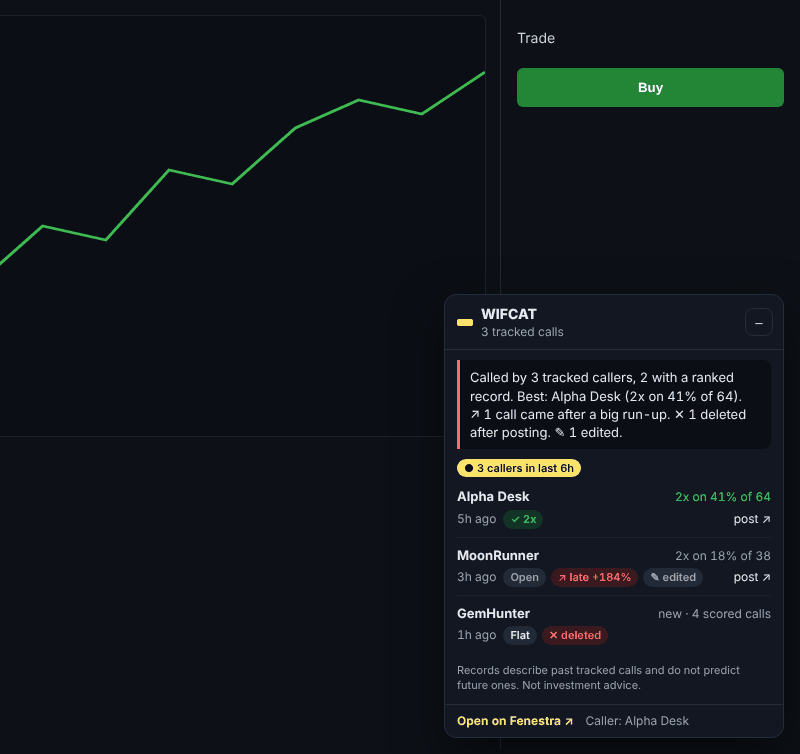
The caller's record, not their follower count
For each call: who made it, how their past calls went (2x rate for memecoins, win rate for majors), and "new" until they have enough scored calls.
Late, edited, deleted
↗ flags calls made after price had already run up hard, when followers risk becoming exit liquidity. ✕ marks posts deleted after the fact, ✎ marks edits.
Pulse, and records on X
A badge when several tracked callers hit the same coin in the last 6 hours. On a caller's X profile, a compact record badge links to their full page.
Install
Chrome Web Store listing coming. Until then, load it unpacked.- Download fenestra-lens.zip and unzip it into a folder you'll keep.
- Open
chrome://extensions(Brave:brave://extensions, Edge:edge://extensions). - Turn on Developer mode (top right).
- Click Load unpacked and pick the unzipped folder (the one with
manifest.json). - Pin Fenestra Lens from the puzzle-piece menu. Open a token on any supported terminal and the panel appears in the corner.
To update, download the new zip, replace the folder's contents, and press the reload arrow on the extension card.
What it reads and sends
Lens reads the page address (and, on pair pages, the token links on the page) to find the contract address, then asks Fenestra's public API who called it. Those lookups are the only requests it makes. It asks for one permission, storage, used to remember the panel's position and your settings. No wallet access, no keystrokes, no browsing history, no remote code. You can turn it off per site in the extension's options.